SOFT RAIN / AMBER LIGHT
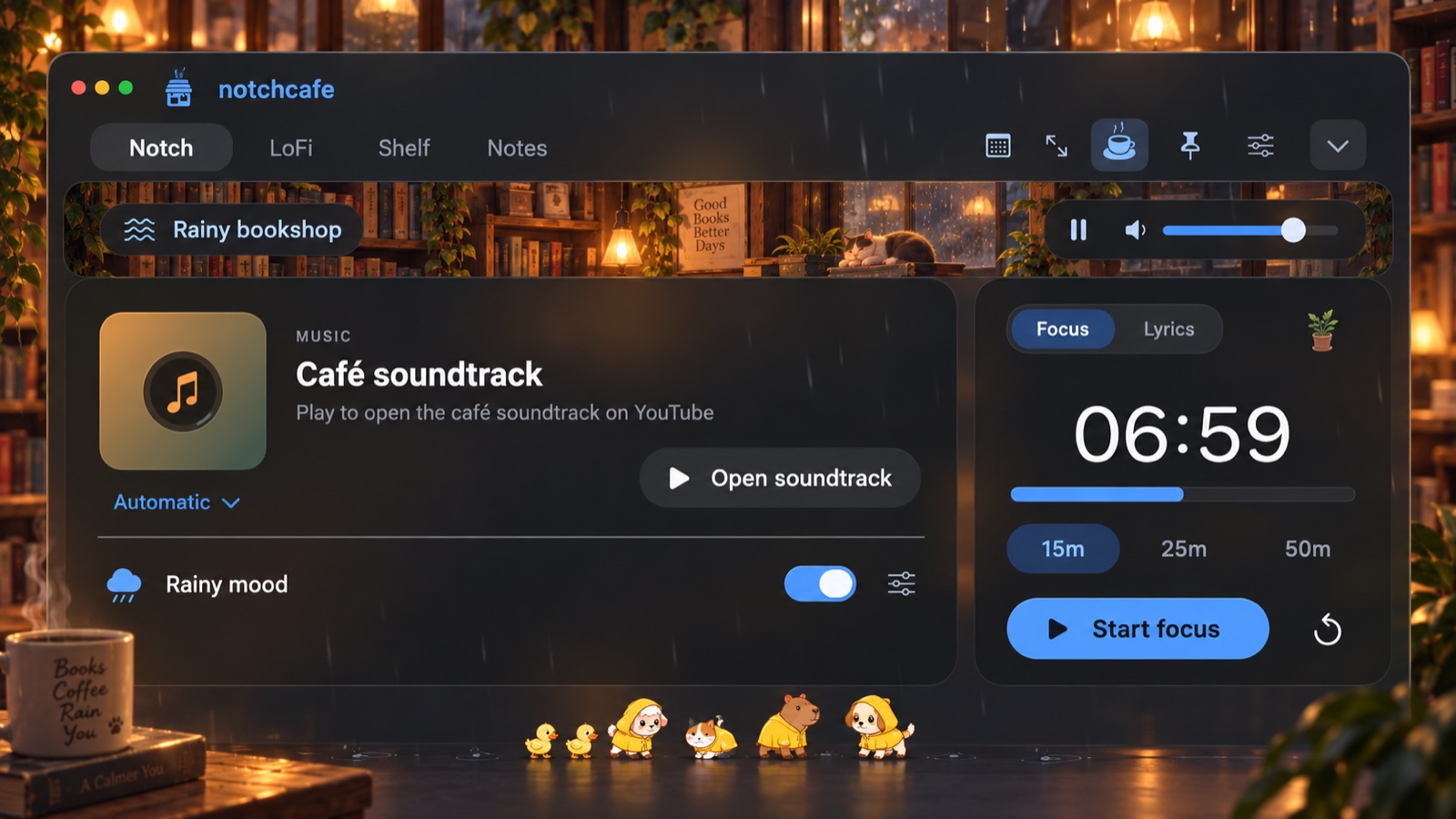
Rainy bookshop
Rain on the desktop. A warm glow in your notch. Little companions taking their time.
 24hr.cafelights on, always
NOTCHCAFE / YOUR EVERYDAY MAC COMPANION
Your soundtrack, a moment to focus, and the things you need next. All tucked into your notch, with little companions to make the workday feel warmer.
7 days trial · No automatic charge
macOS 14+ · Apple Silicon · Works without a notch, too
NOTCHCAFE / IN 15 SECONDS
NOTCHCAFE / RAIN, LOFI & COMPANY
COZY SCENES / SOUND, LIGHT & COMPANY
Pick a scene in the app. Its sound, notch lighting, and companion behavior come together to set the mood.
SOFT RAIN / AMBER LIGHT
Rain on the desktop. A warm glow in your notch. Little companions taking their time.
CAFÉ HUM / VIOLET LIGHT
A gentle room hum, soft ceramic tones, and sleepy company for the later hours.
BIRDSONG / GOLDEN LIGHT
Original birdsong, a little air, and curious companions. A softer start, any day.
Scene audio is bundled for offline listening, with its own pause and volume controls. Your scene is remembered; sound stays paused after relaunch. Your music and screen brightness stay as you set them.
LOFI STUDIO / NINE ANIMATED SCENES
Nine original animated scenes, from Midnight, Coast, and Forest to Cafe Window, Cassette Deck, and Radio Dial, with offline sound and a mix you can shape to fit the hour. These three design concepts play the app’s own scene animation; layouts may differ from the released app.
LoFi includes Music, Atmosphere, World, and Manual modes, with layer mixing, musical key, tempo, and volume controls. The animated videos are silent; each scene's bundled soundscape stays offline, and playback starts paused after relaunch.
THE NOTCHCAFE MENU / INCLUDED IN 1.4.21
Everyday essentials and a few small joys, right at the top of your Mac.
01 / FIND YOUR FLOW
Your soundtrack and your next task, together in one small space.
Apple Music, Spotify, YouTube, and YouTube Music. See what’s playing, play or pause, seek, and skip without switching away.
Apple Music and Spotify use Automation permission. YouTube and YouTube Music work in Chrome or Safari with Automation permission and Allow JavaScript from Apple Events enabled; no extension needed.
Give the next task 15, 25, or 50 minutes. Pause when you need a breather. Your companions settle down while you work, then celebrate a finished session.
Running sessions keep their deadline through sleep, quitting, and Mac restarts. Paused sessions keep their remaining time. If a session ends while closed, completion appears when you reopen with app access.
Expand NotchCafe across your selected display. With LoFi selected, one large centered 16:9 card holds the animated scene, immersion, playback, and mixer controls—without a YouTube player or duplicate sidebar. Other tabs keep the large YouTube player beside compact café controls.
Entering or leaving Full Screen Mode does not pause or restart the LoFi soundscape. Switching to LoFi ends any embedded YouTube session; switching back pauses LoFi only after YouTube preparation succeeds. For connected YouTube or YouTube Music video, playback can continue from its current position; other sources use the café soundtrack.
Switch the right-hand card from Focus to Lyrics to look up words for the track that’s playing.
This is an opt-in LRCLIB lookup. While Lyrics is selected, the app sends the track title, artist, album, and duration to find a match. Results depend on the track and may not be available for arbitrary YouTube videos.
02 / KEEP YOUR DAY CLOSE
A thought worth keeping. A file on its way somewhere. A meeting about to begin.
Drop files or folders into your notch, then drag them into the next app. Keep up to 50 items within reach without moving the originals.
Reveal items in Finder, remove several references at once, and undo the last removal in this session. References survive relaunches. Retry unavailable files when their drive returns. Originals aren’t moved or deleted; the shelf is not a backup.
Create named plain-text notes, pin your favorites, and search titles or contents. Your notes and selected note save automatically on your Mac.
Notes stay local in app preferences. Deletion asks for confirmation; Copy saved notes in License settings exports all notes, even after access expires.
See what’s next, get a countdown before it starts, and join supported Zoom, Google Meet, or Microsoft Teams meetings from the event card.
With optional Calendar access, the collapsed countdown appears 30 minutes before the next event. Join opens supported HTTPS links found in an event’s URL, location, or notes; it never joins automatically. Enable Show subsequent calendar events in Live Activities settings for the agenda. All-day events are excluded.
03 / MAKE YOURSELF AT HOME
A rainy afternoon, a familiar companion, and a little life around the edges.
Choose kittens, puppies, capybaras, and sheep—up to five of each—and invite Puddles, Pip, Peep, and Poppy along. Click to show some love, with an occasional tiny leaf or coffee-bean gift.
Choose companions and adjust their size from 75% to 150% in Pets settings. Ducks are off by default. Pet movement follows your animation preferences and macOS Reduce Motion.
Turn an ordinary afternoon into a rainy one. Original stereo rain plays while drops fall across your display and splash inside the notch. Set sound and rain intensity separately.
Rain settings are remembered. At minimum intensity a light drizzle remains; pause to stop it. Rain is click-through, and manual ambience works offline. Optional Accessibility access enables Dock splashes. Rain visuals respect Animations and Reduce Motion.
See current local conditions in the notch. With Location access, Rainy Mood can start automatically for drizzle, rain, or thunderstorms.
Optional foreground location access. An approximate location is sent to Open-Meteo for weather; there is no background location tracking.
Miso and Biscuit curl up together. A curious duckling tags along with a new friend. Enable hide-and-seek for the occasional pair of ears peeking over a card.
Cozy night shift gathers companions for naps using fresh, authorized local weather. Rain brings raincoats and shake-offs; sunny days bring naps. Focus and motion preferences take priority. Choose these behaviors in Pets settings.
A bird drops by. A butterfly passes the window. A cat peeks in, and your coffee steam occasionally turns into a heart, paw, or crescent moon.
Window visitors and coffee steam doodles are optional in Appearance settings. They are decorative and click-through, and stop when animations are off or Reduce Motion is on.
04 / YOUR MAC, YOUR WAY
Make the space fit your day, from the first song to the last task.
Music, focus, calendar, and shelf indicators stay close when the notch is collapsed. A primary activity and a separate clickable secondary indicator keep two things in reach.
Choose activity types, timeout, click-to-open, hover details, and song-change opening. Dismiss with a right-click; restore in settings. Not iPhone activity mirroring.
Solid or Liquid Glass. Choose independent background and accent colors, adjust opacity, and set clock visibility and animations.
Native Liquid Glass requires macOS 26. Earlier versions use frosted material. Turn animations off for a quieter space. macOS Reduce Motion and Reduce Transparency are respected. Preferences save automatically.
A long download or a task that needs more time? Toggle the coffee cup to prevent idle system sleep while NotchCafe runs. Your preference is remembered.
The display can still turn off. Manual sleep and closing the lid still work. Uses more battery; quitting releases it.
FOCUS GARDEN / A LITTLE GROWTH
Each completed focus session helps your garden grow. Unlock flowers and pots at your own pace, with progress saved on your Mac.
No wilting. No streak penalties. Just a little reminder of the time you gave yourself.
Explore the garden design ↗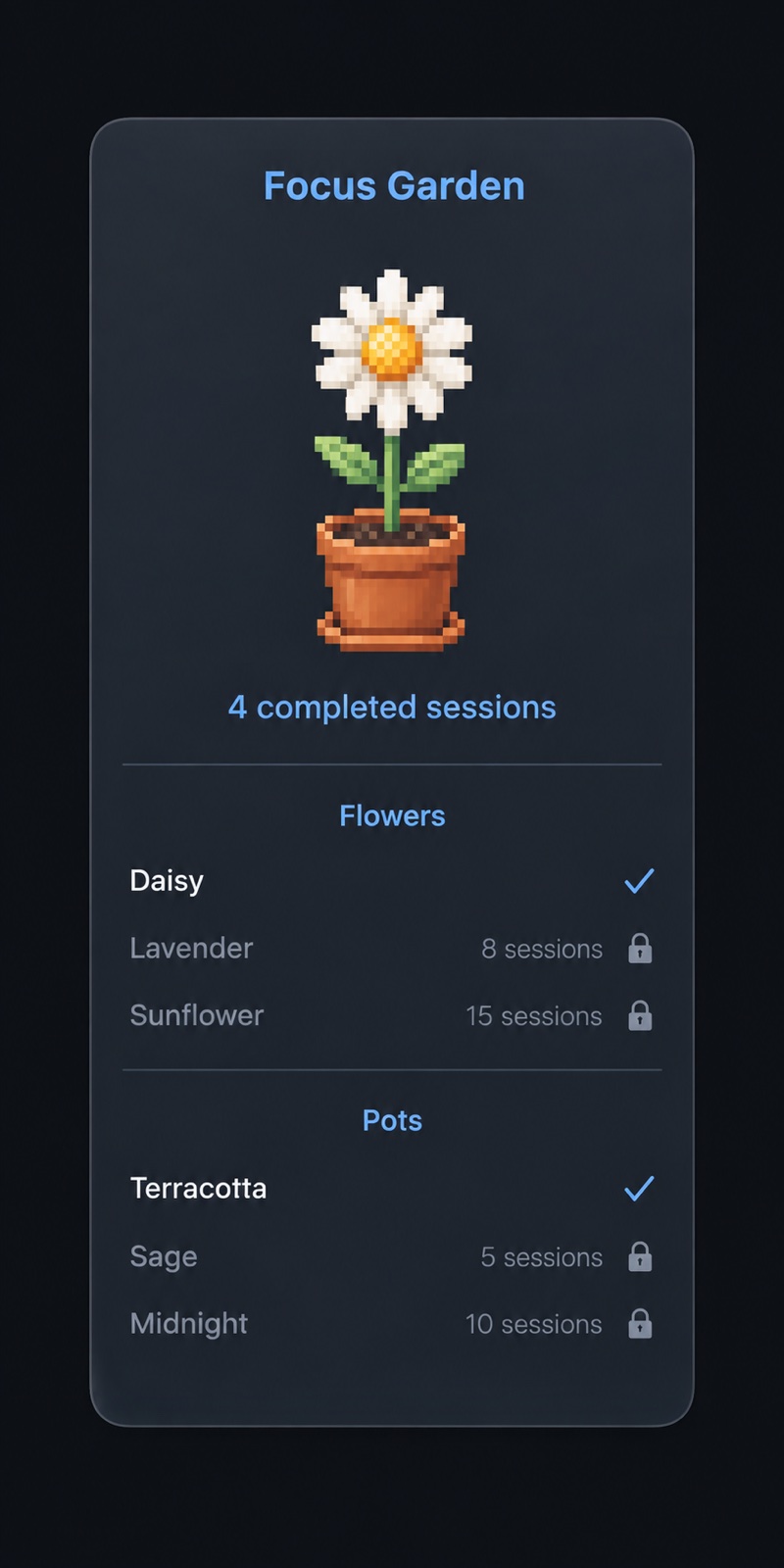
TRY A LITTLE / BROWSER DEMONSTRATION
Try a little of the café, right here.
Start a focus timer, put on a soundtrack, or explore the notes and file-shelf preview. This browser demo does not control the native Mac app.
Native Mac app · macOS 14+ · NotchCafe 1.4.21
BROWSER SIMULATION NOT CONNECTED TO THE MAC APP
NOW PLAYING ııı
Café soundtrack
Selected for your stay · YouTube
☼ FOCUS TIME
A SOUNDTRACK FOR YOUR STAY
A little music. A little rain.
Loads YouTube only when you choose. YouTube receives connection data and your site origin.
Load YouTube to enable the music controls.
BEFORE YOU SETTLE IN
macOS 14 or later on Apple Silicon, with or without a notch. NotchCafe lives in the menu bar, not the Dock. Choose one display to host it; a compact black handle appears on displays without a notch.
Notes and file bookmarks are local. The Mac app has no analytics, camera, or microphone access. Notes are ordinary local app preferences, not an encrypted vault; the Shelf keeps references, not backup copies. Calendar access is optional; music and some player controls use Automation. Location is optional for local weather and automatic Rainy Mood. With permission, an approximate location is sent over HTTPS to Open-Meteo; weather stays in memory, with no background location tracking. Trial and license activation contact 24hr.cafe over HTTPS, with credentials stored in Keychain.
NotchCafe 1.4.21 is ready for macOS 14+ on Apple Silicon. The app is Developer ID signed, hardened-runtime enabled, and Apple notarized. Open the downloaded DMG and drag NotchCafe.app into Applications. If your download is a ZIP, unzip it and move NotchCafe.app into Applications. The browser preview is a demonstration, not a connection to the Mac app.
Download and open NotchCafe, then start your seven-day trial from the notch or Settings → License. Hover at the top center of your chosen display to open it. Connect the features you want in Settings → Permissions. Enable Launch at login if you’d like it ready when you sign in.
Hover to open, pin to stay, Escape or the chevron to collapse. Adjust hover opening and the collapse delay, or open from the menu bar. Keyboard focus keeps the panel open while you edit. Enable Launch at login in General settings to have NotchCafe ready when you sign in; macOS may ask you to approve it in Login Items. Choose one display at a time. No notch? A compact black handle gives you the same place to land. You can hide Live Activities on notchless displays.
Bundled rain and scene audio, notes, file references, and the focus timer work locally while your app access is valid. Starting a trial or activating a license needs internet. Purchased licenses reconnect at least once every seven days. Weather and YouTube also need a connection.
The trial never charges you automatically. Choose monthly or permanent access only when you’re ready. Your notes and file references are preserved if access expires, and Settings → License → Copy saved notes lets you export every note.
Use Settings → Updates → Check for Updates, then install and relaunch when an update is available. Notes, preferences, and licensing data are preserved. If you’re using version 1.4 or earlier, download the current app once to get the built-in updater.
Seven days to make it part of your day. Then choose your kind of cozy.
Your trial never charges you automatically. Both options include all released features above. Any applicable taxes are shown at checkout.
24hr.cafe is the home of NotchCafe. Made for the little things that make a Mac feel like yours.
Website insights use daily page-view and click counts, plus referring domains, with a 90-day reporting window. No analytics cookies or visitor identifiers. Do Not Track and Global Privacy Control are respected.